
Roles
Assigning roles to team members on Solvimon
We offer flexible access control via granular roles, allowing you to configure the appropriate access levels for each member of your account.
Refer to this document to understand how to add a user.
Understanding role names
In Solvimon, there are three role types available for each resource, namely:
<Resource> Viewer- Can view the resource.<Resource> Contributor- Can contribute to the resource. Usually implies that the user will be able to create, modify, and view the resource.<Resource> Administrator- An administrative role for the resource. Usually implies that the user is able to create, modify, view, delete, and perform other administrative actions on the resource, e.g. Deprecate a Meter.
For a full list of available roles, please take a look at this table
Giving access to users
Access is controlled by assigning roles to existing users on your Solvimon account.
To assign roles in Solvimon, follow these steps:
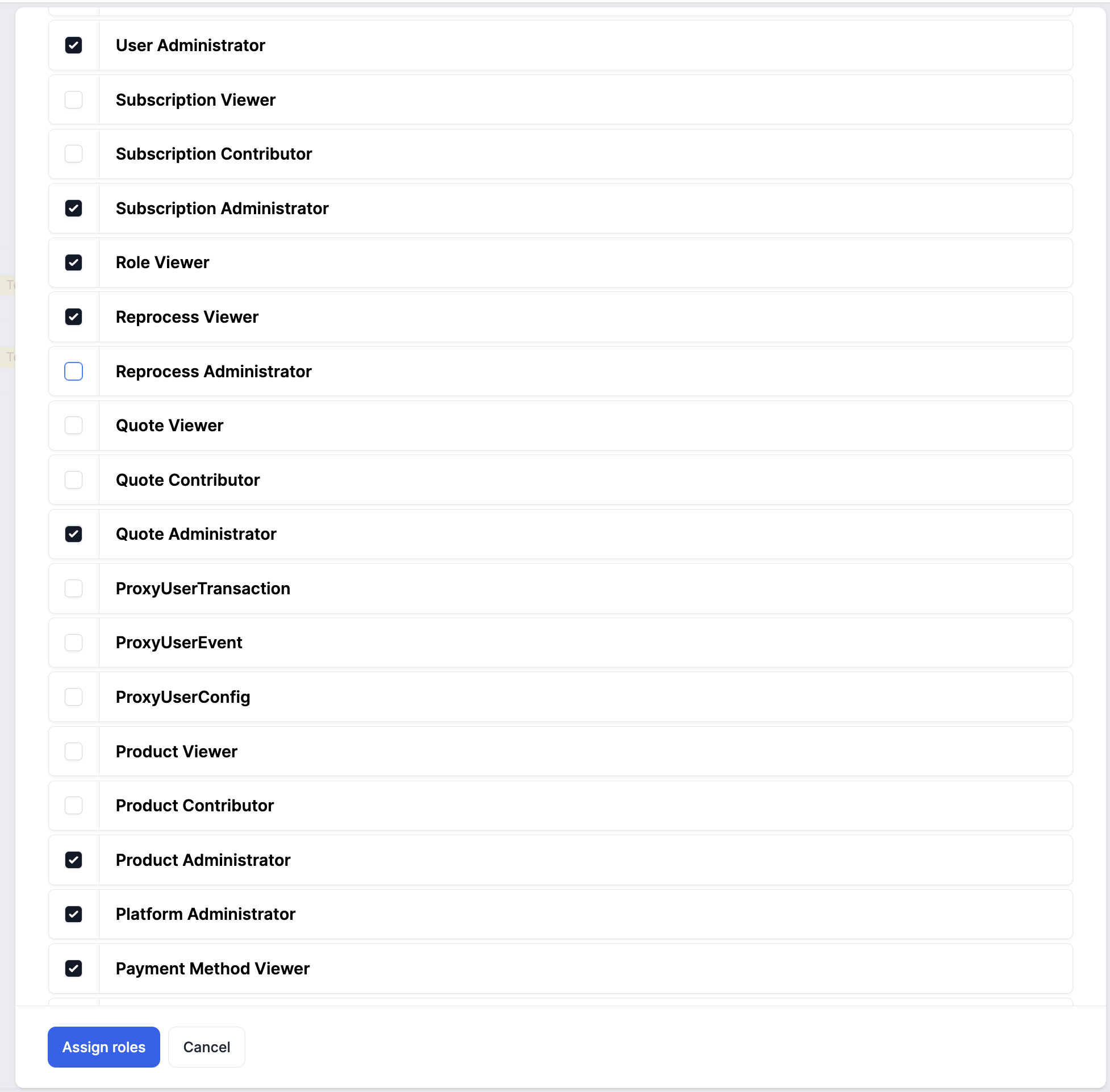
- Click Settings > Users > Edit Users > Assign Roles
- Select/unselect the roles that are relevant
- Click the Assign Roles button
For an existing user, click on the badge on the table that mentions the platform and environment.

Clicking on this will open up a form that lets you view the permissions that are already enabled on this user.
Available roles in Solvimon
In Solvimon, roles are organised into resource categories, allowing users to access specific features. The table below outlines the roles available for each resource category
| Resource Category | Role Name | Description |
|---|---|---|
| Billing Entity | Billing Entity Administrator | Can view, create, and modify billing entities. |
| Billing Entity | Billing Entity Viewer | Can view billing entities but is not allowed to make changes. |
| Billing Entity | Payment Acceptor Administrator | Can view, create, modify, and delete payment acceptors. |
| Billing Entity | Payment Acceptor Viewer | Can view payment acceptors but is not allowed to make changes. |
| CPQ | Quote Administrator | Can view, create, modify, and delete quotes. |
| CPQ | Quote Contributor | Can view, create, and modify quotes. |
| CPQ | Quote Viewer | Can view quotes but is not allowed to make any changes. |
| Customer | Contact Administrator | Can view, create, modify, and delete contacts. |
| Customer | Contact Viewer | Can view contacts but is not allowed to make changes. |
| Customer | Customer Administrator | Can view, create, and modify customers and contacts. |
| Customer | Customer Draft Contributor | Can view, create, and modify customers and contacts in the Draft status. Can't activate a customer. |
| Customer | Customer Viewer | Can view customers but is not allowed to make changes. |
| Invoice | Credit Invoice Contributor | Can create credit invoices. |
| Invoice | Invoice Administrator | Can view and modify invoices, create one-off and credit invoices, and edit invoice settings. |
| Invoice | Invoice Contributor | Can view and modify invoices, as well as create one-off and credit invoices. |
| Invoice | Invoice Viewer | Can view invoices but is not allowed to make any changes. |
| Invoice | One-off Invoice Contributor | Can create one-off invoices. |
| Meters and Events | Metering Administrator | Can view, create, modify, and delete meters, meter properties, and meter values as well as upload meter data files and ingest events. |
| Meters and Events | Metering Viewer | Can view meters, meter properties, and meter values but is not allowed to make changes or ingest events. |
| Meters and Events | Reprocess Administrator | Can view and manually trigger reprocessing jobs. |
| Meters and Events | Reprocess Viewer | Can view reprocessing logs. Can't trigger a reprocessing. |
| Payments | Payment Administrator | Can view, create, modify, and delete payment schedules. |
| Payments | Payment Method Administrator | Can view, create, modify, and delete payment methods. |
| Payments | Payment Method Viewer | Can view payment methods but is not allowed to make changes. |
| Payments | Payment Viewer | Can view payments processed by an integrated PSP. |
| Platform | Alerts Administrator | Can view, create, modify, and delete alert rules, as well as view alerts. |
| Platform | Alerts Viewer | Can view alerts. |
| Platform | Approval Policy Administrator | Can view, create, and modify approval policies. |
| Platform | Approval Policy Viewer | Can view approval policies but is not allowed to make changes. |
| Platform | Audit Record Viewer | Can view audit records. |
| Platform | Branding Administrator | Can modify the branding of the platform. |
| Platform | Bulk Action Administrator | |
| Platform | Bulk Action Contributor | |
| Platform | Bulk Action Viewer | |
| Platform | Custom Field Administrator | Can view, create, modify, and delete custom fields. |
| Platform | Custom Field Viewer | Can view custom fields but is not allowed to make changes. |
| Platform | Integration Administrator | Can view, create, modify, and delete integrations to external systems. |
| Platform | Integration Viewer | Can view integrations to external systems but is not allowed to make changes. |
| Platform | Platform Administrator | Can view, create, modify, and delete platform settings. |
| Platform | Role Viewer | |
| Platform | User Administrator | Can view, create, modify, and deactivate users and API users. |
| Platform | User Viewer | Can view users and API users but is not allowed to make changes. |
| Platform | Webhook Administrator | Can view, create, modify, and delete web-hooks. |
| Platform | Webhook Viewer | Can view webhook configurations but is not allowed to make changes. |
| Products and Price Plans | Feature Administrator | Can view, create, modify, and delete features. |
| Products and Price Plans | Feature Viewer | Can view features but is not allowed to make changes. |
| Products and Price Plans | Pricing Approver Role | Can view products, product groups, and pricing plans but is only allowed to activate price plans. |
| Products and Price Plans | Product Administrator | Can view, create, modify, and delete products, product groups, and pricing plans. |
| Products and Price Plans | Product Contributor | Can view, create, and modify products, product groups, and pricing plans. |
| Products and Price Plans | Product Draft Contributor | Can view, create, and modify products, product groups, and pricing plans, in Draft status. Can't activate products or price plans. |
| Products and Price Plans | Product Viewer | Can view products, product groups, and pricing plans but is not allowed to make any changes. |
| Products and Price Plans | Subscription Administrator | Can view, create, modify, and delete subscriptions and schedules, as well as cancel subscriptions and edit the default subscription settings. |
| Products and Price Plans | Subscription Contributor | Can view, create, and modify subscriptions and schedules. |
| Products and Price Plans | Subscription Draft Contributor | Can view, create, and modify subscriptions and schedules, in the Draft status. Can't activate subscriptions. |
| Products and Price Plans | Subscription Viewer | Can view subscriptions and schedules but is not allowed to make changes. |
| Profile | Administrator | Contains all Administrator Roles. |
| Profile | Sales Representative | Contains all roles required for Quote to Subscription process. |
| Reporting | Report Administrator | Can view reports, and can view and modify report configurations. |
| Reporting | Report Configuration Administrator | Can view, create, modify, and delete report configurations. |
| Reporting | Report Configuration Viewer | Can view report configurations but is not allowed to make any changes. |
| Reporting | Report Subscription Administrator | Can view, create, modify, and delete report subscriptions. |
| Reporting | Report Subscription Contributor | Can view, create and modify report subscriptions. |
| Reporting | Report Subscription Viewer | Can view report subscriptions but is not allowed to make any changes. |
| Reporting | Report Viewer | Can view and download reports. |
Role combinations
Due to the granular roles, you are able to be flexible with combining roles to create various personas, e.g. a Sales Person who will only have access to the relevant resources.
However, even though the flexibility there are some mandatory roles if you want to give the user the correct access to view certain resources.
Subscription Viewer
If you want a user to be able to only view Subscriptions in Desk, then it's recommended to assign them the following roles:
- Invoice Viewer - this is to allow the user to view the invoices for the subscription in the subscription details page.
- Customer Viewer - this is to allow the user to view which customer the subscription is for.
- Product Viewer - this it so allow the user to view which pricing plan is assigned to the subscription.
- Subscription Viewer - this is to allow the user to view the subscriptions in the system as well as the details of any subscription.
Profiles
To facilitate the assignment of roles to users, there are some roles that act as profiles, and are built based on other multiple underlying roles. Curently, Solvimon has:
- Administrator Role: Scopes all administrator level roles.
- Sales Representative: Contains all the roles required to set up a Quote and translate it into a Subscription. The specific roles are:
- Custom Field Viewer, Customer Draft Contributor, Payment Acceptor Viewer, Approval Policy Viewer, Metering Viewer, Invoice Viewer, Subscription Viewer, Feature Viewer, Customer Viewer, Contact Viewer, Billing Entity Viewer, Alerts Viewer, User Viewer, Product Viewer, Quote Contributor
Updated 3 months ago