
Invoice Lifecycle
Understanding Invoice Statuses in Solvimon
Invoice statuses
In Solvimon's platform system, invoices undergo several statuses that signify different stages of the billing cycle. Understanding these statuses is key to managing and tracking invoices effectively.
Here’s an overview:
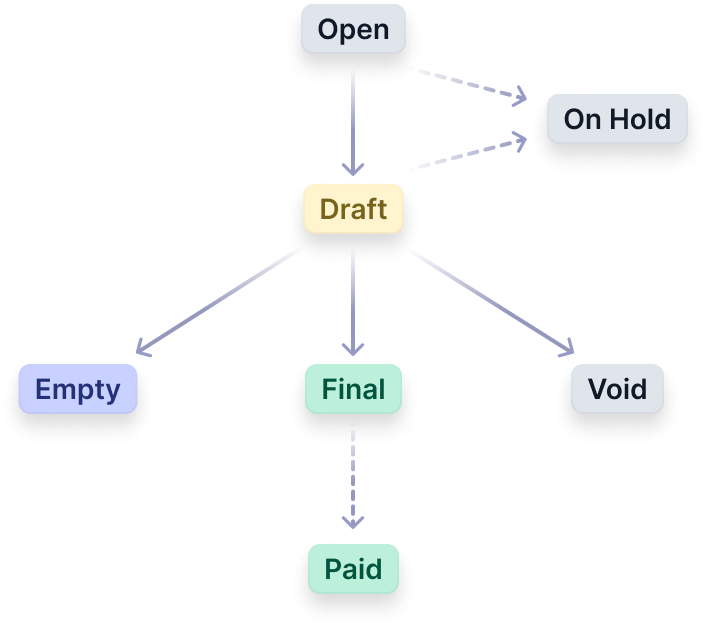
Invoice status update automations
Invoice statuses are automatically updated, unless you change the settings.
A grace period is a designated duration during which invoices retain their Draft status, providing an opportunity for thorough review and necessary modifications before finalisation and subsequent submission for payment collection.
During this period, the invoice remains in the Draft status, allowing users to ingest events for the billing period and make necessary adjustments.
The standard grace period setting of Solvimon accounts is 8 hours, after which the invoice is set to be Final and thus irreversible and unchangeable.

Setting an invoice to 'On Hold'
The On-Hold keeps the invoice from moving from Draft to Final automatically. This gives more time to check the invoice details before it goes to Final. Once an invoice is in On-Hold, it remains Draft unless manually advanced, or unless the On-Hold is removed again. If an invoice was On-Hold and the On-Hold is removed, we will schedule the invoice to be updated to Final in 8 hours after removing On-Hold.
If an invoice was not On-Holdto begin with, it will move to Final 8 hours after it went to Draft. The 8 hours are meant for review and adjustments before finalisation and payment collection. If needed, the invoice can manually be moved to Final earlier.
Note on the 8-hour grace period: this is a default. If you do not want to set invoices to On-Hold by default, but want a longer grace period, please contact us and we can change the window for you.
Key points to remember:
On-Holdstatus can be applied to invoices inOpenorDraftstages.- An invoice can be
On-Holdby default by setting it viaSettings->Platform->Subscriptions->Initial invoice on holdtoyes - An invoice that is
On-Holdwill not move fromDrafttoFinal - Invoices in
On-Holdcan still receive event data - To progress to
Final, invoices inOn-Holdmust remove theirOn-Holdmanually.
On Hold and Paid status
While the platform UI displays On Hold and Paid as possible invoice statuses, these are functional/business statuses only.
From an API perspective, the status field does not include these values. Instead, they are represented separately using boolean fields:
on_hold→ Indicates whether the invoice is on holdpaid→ Indicates whether the invoice has been paid
Updated 7 months ago