
Customer portal
The customer portal is a billing page that Solvimon builds and hosts for one of your customers. It shows what they are subscribed to, what they have used, and what they have been invoiced, and it lets them pay and keep their billing details up to date without a login on your side.
What it does
The portal gives one customer a view of their own billing, so the routine requests that would otherwise reach your support queue become things the customer resolves on the page: fetching an invoice, checking what they pay for, correcting a VAT number, or paying something overdue.
Depending on how you configure the link, it can show:
And it can let them:
Each link is created for one specific customer and carries a token that identifies them, so they see their own data without logging in.
When to use it
Two common ways to put the portal in front of a customer:
- A “Manage billing” button in your product. Create a link when the customer clicks it and send them straight there. They are already signed in on your side, so the link never travels anywhere else.
- A link in an email. Useful for chasing payment: allow paying an open invoice, and the customer can settle it directly from the email.
If you would rather show this inside your own product, the SDK’s Customer overview screen renders the same data as components you mount yourself. That screen has its own fixed layout and does not read the settings below.
Create a portal link
A portal link is a portal URL of type CUSTOMER. display chooses the sections, and options chooses the actions.
Send the customer the url from the response.
Both objects are set per link, so the same customer can get a full-access link in your product and a read-only link by email. For a read-only view, leave the sections on and turn the actions off:
See Create a portal URL for the full schema.
Self-serve upgrades
If the customer’s subscription is self-serve, the portal also lets them change what they are subscribed to. From My subscription, Upgrade subscription shows the add-ons available on their plan.
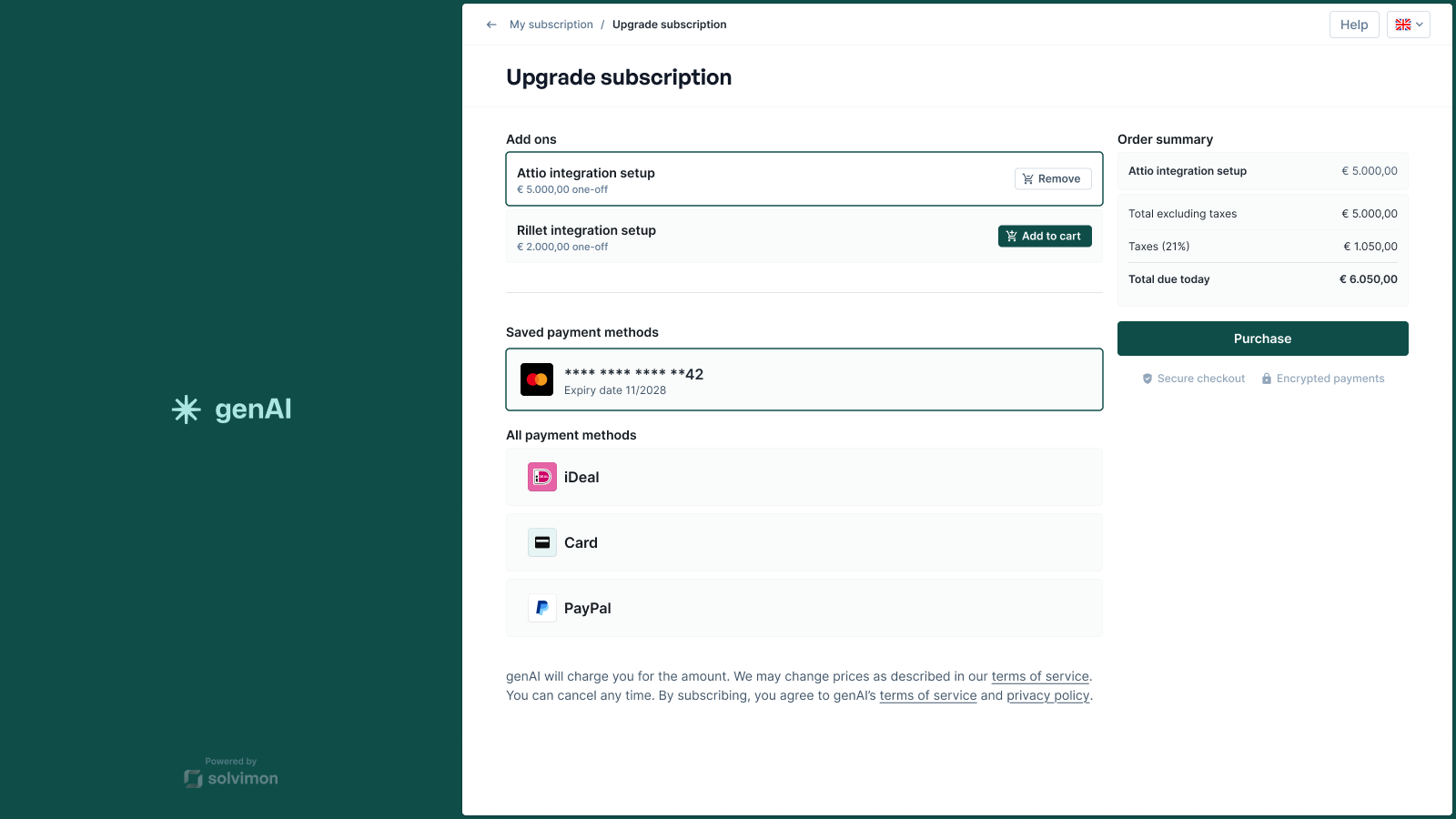
The customer adds an add-on to the cart, and the order summary prices it with the correct tax and shows what is due today. They can pay with a payment method already saved on their account or choose another one the connected PSP offers. Purchase applies the change to the subscription and takes the payment in the same step, so there is nothing left for you to approve.
Self-serve plan changes covers the API behind this: the schedule that gets created, the two start dates available, and what must be true of the subscription and payment method before the option appears.
Branding
The portal is styled with your branding, set in Desk under Settings > Branding:
The same settings apply to hosted checkout and to your invoices, so you configure them once. See Customising invoices.
Revoking a link
Because the link opens one customer’s billing data without a login, treat it like a credential: send it to the customer rather than publishing it. If it reaches the wrong person, revoke it:
The link then reports status: "REVOKED" and no longer opens. Links stay valid until revoked, so generate a fresh one per visit for anything sensitive rather than storing one per customer.
Via Desk
Portal links can also be generated from a customer’s detail page in Desk, which is the quickest route for a support agent handling a one-off request.
Things to know
- One customer per link. Parent and child customers each need their own link.
- Available payment methods depend on the PSP. What a customer can add, change, or remove comes from the connected provider. See Payment Options.
- Cancellation is a platform setting. Whether customers can cancel a subscription is configured platform-wide, not per link. Check it before telling customers they can cancel here.
- Edits apply going forward. A billing address change affects future invoices, not ones already finalised.