
Price indexation
How to move every price on a subscription by a percentage in one call, for an annual uplift or a contractual inflation clause, instead of editing each price by hand.
Why this matters
Most enterprise contracts carry an uplift clause: prices rise by a fixed percentage, or by an inflation index, at each renewal. Applying that by hand means editing every price on the schedule, and a plan with tiered pricing, per-currency configs and condition groups has far more prices than the commercial agreement suggests. Missing one produces an invoice the customer disputes.
Indexation applies the percentage to all of them at once and produces a new schedule with the result, so the uplift is a single reviewable action with a single start date.
How it works
Indexation runs as part of copying a schedule. There is no separate endpoint: you pass indexing settings on Copy a pricing plan schedule, and the copy comes back with the adjusted prices. The source schedule is never modified, so the old prices stay intact for the periods they billed.
Each price is recalculated as original × (1 + percentage / 100) and then rounded. A positive percentage raises prices, a negative one lowers them. Values that are zero or unset are left alone, so an intentionally free tier stays free.
copy only. migrate moves a schedule to a different pricing plan version and ignores indexing settings.What gets indexed
Indexation moves money, not thresholds. Within every pricing band it adjusts:
For a tiered price this means every tier’s price moves and the tier boundaries stay where they are: a customer who used to pay a lower rate above 10,000 units still crosses at 10,000 units. Condition groups are indexed recursively, so a price nested under two conditions is adjusted along with the rest.
Rounding
rounding_mode is required on every set of indexing settings, and rounding is always half-up.
PRESERVE_SCALE is the safer default for usage prices, where the fourth or fifth decimal carries real money at volume. Use DECIMALS when the output has to match a rate card printed to two decimals.
Index every price
Send indexing_settings and nothing else. Every price the schedule bills is indexed: the prices in its linked pricing plan version, and any pricing defined directly on the schedule.
The response is the new schedule, with the indexed prices in its combined_pricing_plan_version.
Where the schedule already carried a price override, the override is indexed. Where it did not, indexation creates one from the plan’s list price, because the indexed price is by definition specific to this customer. A schedule that started out entirely on list prices therefore comes back fully overridden. That is the intended outcome: from this point on, the customer’s prices no longer follow changes to the plan.
Index a subset
Pass one or more target lists to index part of the schedule. Any price you leave out is copied across unchanged.
Each entry is an object with an id and an optional indexing_settings that overrides the top-level one for that target only. This is what a contract with different uplifts per product needs: a global 3% with 5% on one product is one request.
A target must resolve to something the schedule actually bills, either through its pricing plan version or through its own pricings; an id that belongs to neither is rejected naming the index that carried it, for example pricings.1.id. A target list that is present but empty is rejected as well, because “index nothing” is expressed by leaving indexation out.
Every target needs settings from somewhere. If a target has no indexing_settings of its own and the request has no top-level indexing_settings, the request fails on pricings.{index}.indexing_settings rather than silently skipping that price.
Overlapping targets do not compound. Within one request the pricing rules are indexed first, then the revenue items, then the pricings, and a rule that has already been indexed is skipped when a broader target would reach it again. Naming a product and one of its revenue items in the same request moves that item’s price once.
Via Desk
On the panel that adds a schedule, turn on Index pricings, then choose the scope:
All pricings takes one percentage and one rounding mode for the whole schedule.
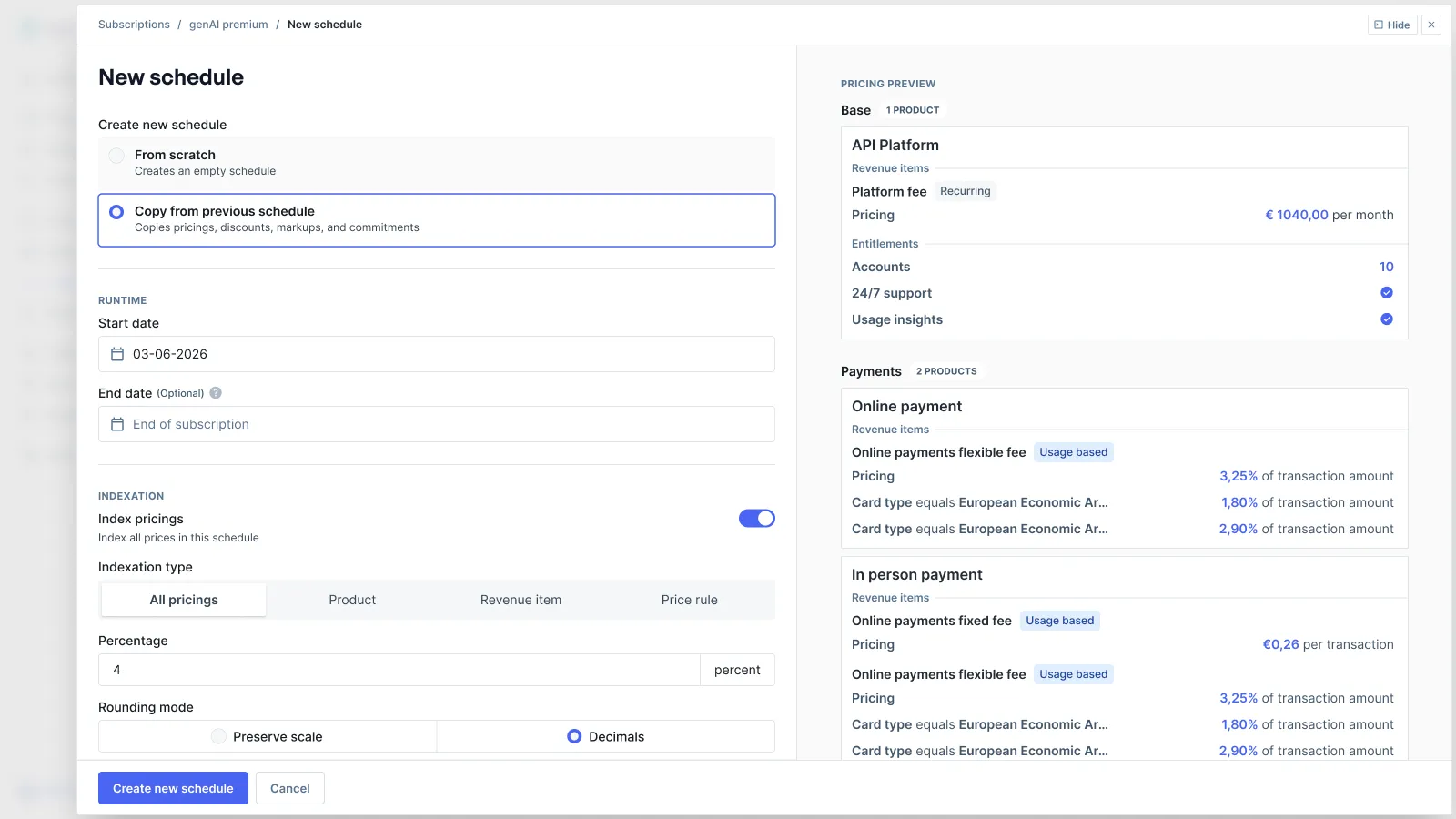
Any other scope lists the entries individually, each with its own percentage and rounding mode. Leave a percentage blank to leave that entry out: only the entries you fill in are indexed, so raising one product on a schedule with twenty does not mean typing the same number twenty times. Leaving every entry blank is treated as indexation being switched off.
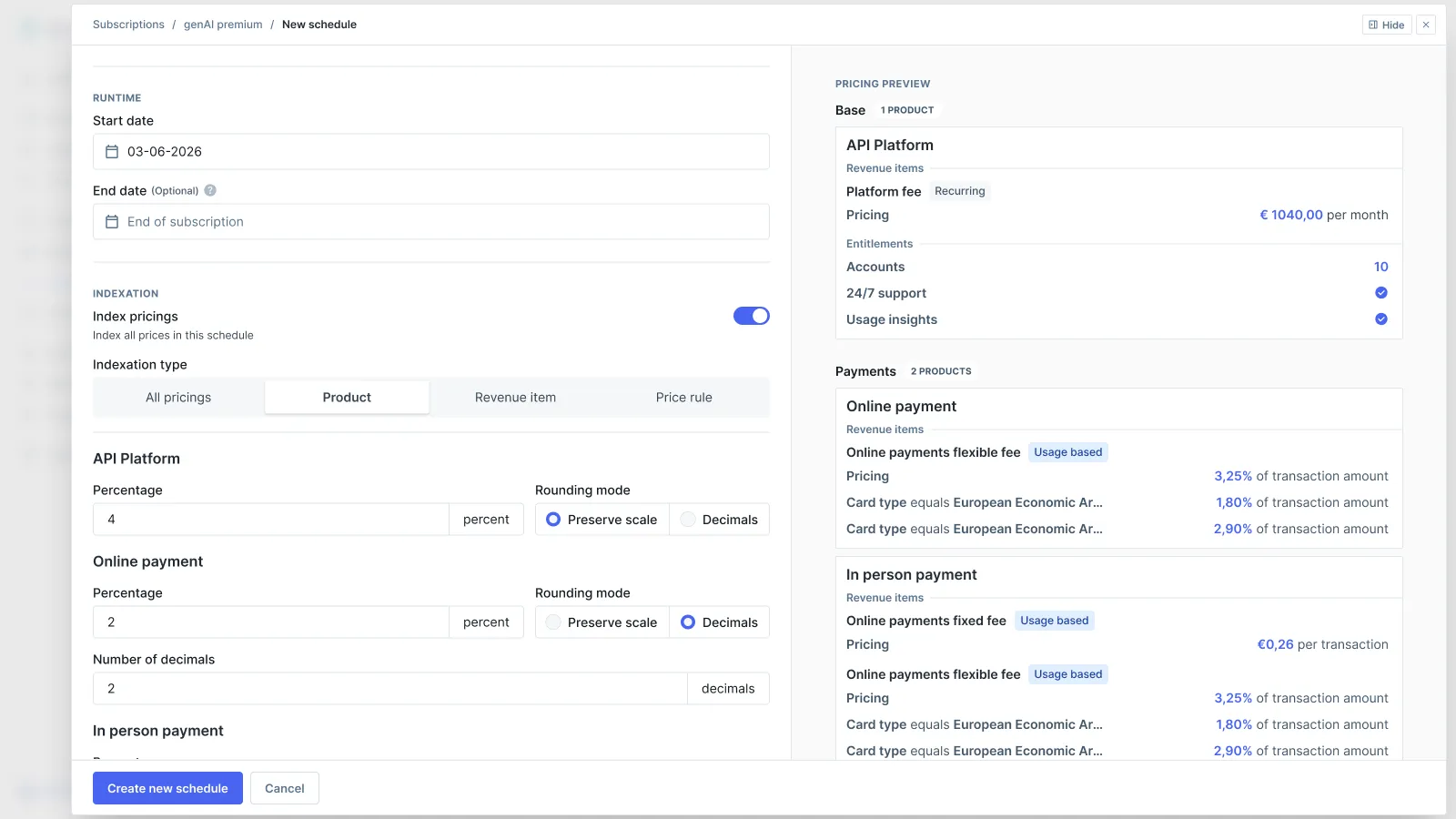
The preview panel on the right shows the schedule that will be created. Confirming creates it.
Edge cases
- Rate cards cannot be indexed. A schedule based on a rate card is rejected with an
indexing_settingserror. Rate cards do not support price overrides, and an indexed price is an override. Move the customer to a standard pricing plan if they need a negotiated uplift. - A schedule with nothing to index is rejected. A schedule with neither a pricing plan version nor its own pricings fails on
indexing_settingsrather than producing an empty copy. - Only the matching currency and billing period are indexed. Where a pricing item carries configs for several currencies or billing periods, indexation touches the variant matching the schedule’s own
pricing_currencyandbilling_period. The others are copied unchanged. percentageis a string and must parse as a number. It is validated up front, so"4","4.5"and"-2"all work and a malformed value fails the request instead of leaving prices untouched.- The copy inherits the source schedule’s status. Copying a draft produces another draft. Set
statuson the request to override that, and see Draft schedules if you want the uplift reviewed before it bills.