
Overview
The Solvimon Frontend SDK lets you embed billing UI elements directly into your product: invoices, subscriptions, checkout, and payment methods, without building any of it yourself.
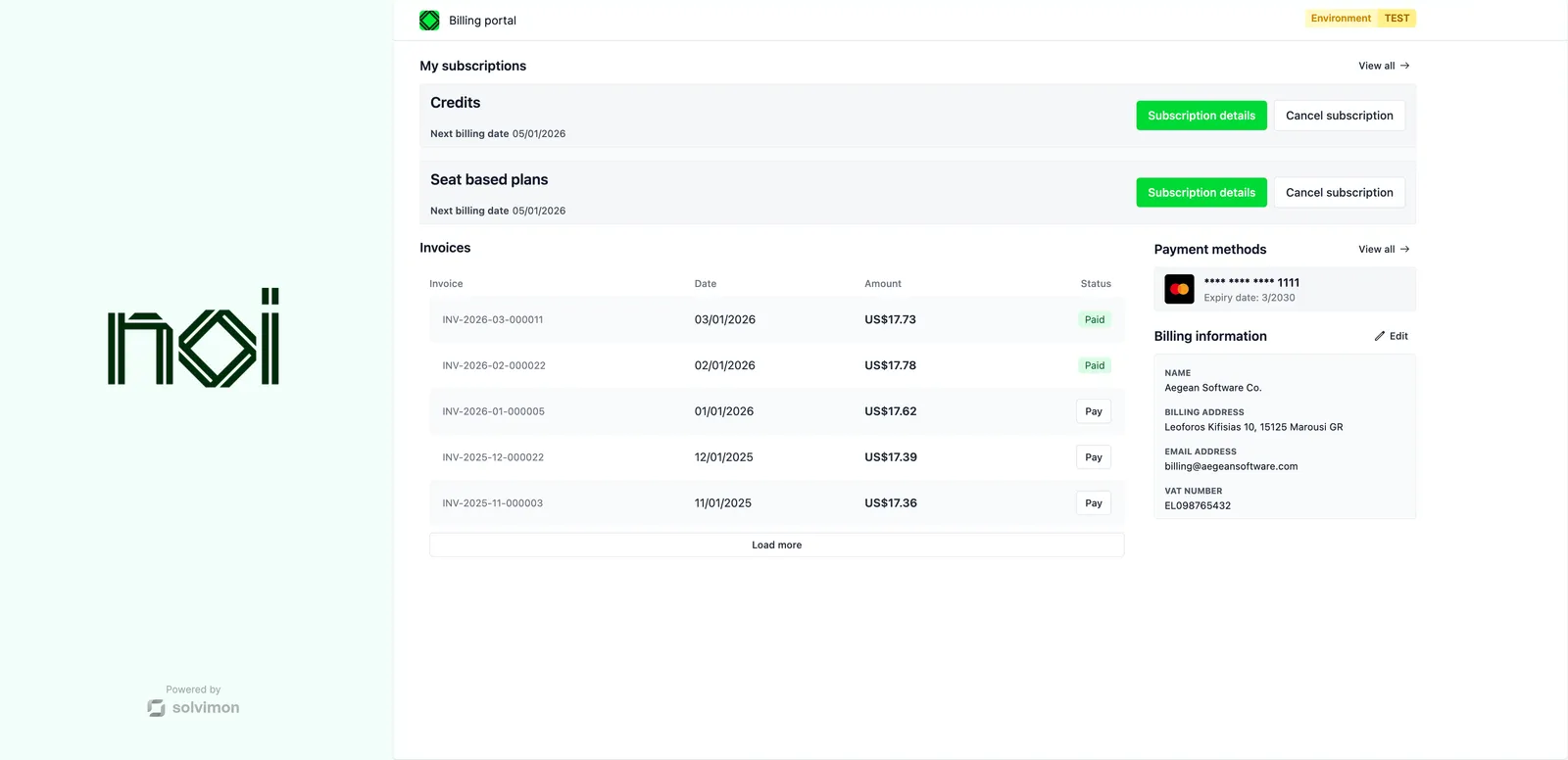
What’s in the SDK
The SDK exposes two types of UI:
Screens are full-page compositions. Drop one in when you want a complete billing experience with minimal setup.
Components are single-responsibility widgets. Use them when you need more control over layout or want to compose your own billing page.
How it works
Every screen and component requires a portalObject: a short-lived token your backend generates via the Solvimon API. The SDK uses it to authenticate requests on behalf of the customer. Your frontend never handles API keys directly.
The typical flow:
- Customer loads a page in your product.
- Your backend calls the Solvimon API to create a portal URL for that customer.
- Your frontend passes the portal URL to the SDK when mounting the screen or component.
Action requests
Instead of navigating internally, the SDK fires action-request custom DOM events that bubble up to your app. You decide what happens when a customer clicks to pay an invoice or view a subscription. The SDK tells you that the click occurred.
The event’s detail has an action and, for some actions, a data object. These are the actions:
In TypeScript, import the RequestActionEvent and ActionRequestDetail types from @solvimon/solvimon-web/core.