
Invoice lifecycle
Every invoice moves through a fixed set of statuses, from an open billing period to a final, immutable document. This page covers each status, the automations that move invoices between them, and how to hold or void an invoice along the way.
Invoice statuses
Open
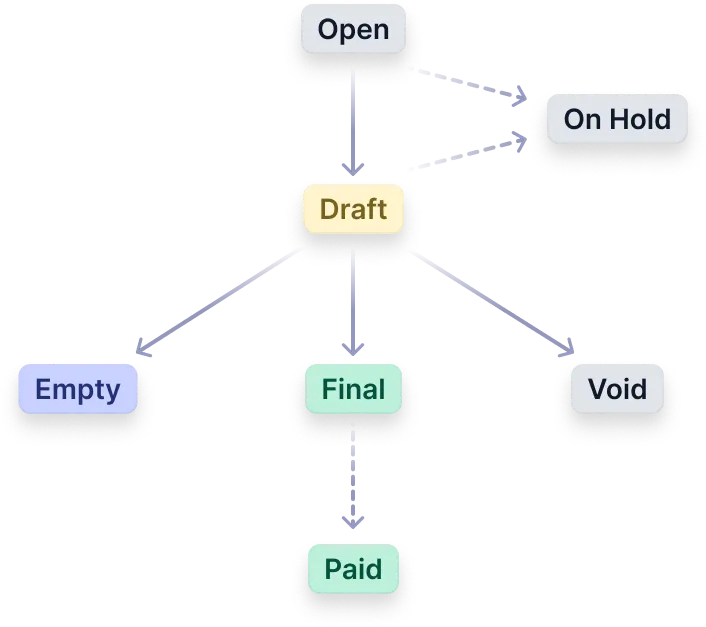
Invoices in the Open status represent ongoing billing periods. They remain subject to modifications when new charges, such as additional usage events, occur within the customers’ subscriptions.
Draft
Invoices automatically transition to the Draft status when the billing period concludes. This transition occurs 2 hours after the billing period ends.
The Draft status grants a grace period of 8 hours, so you can:
- Make adjustments and edits to the invoice details, ensuring accuracy before finalisation.
- Add more events within the billing period to include any missed or delayed usage data in the invoice.
Once all the changes are done, you can wait for the grace period to end (the status will automatically switch to Final), or manually move it to Final using the API or Desk.
Final
Final invoices are those with fixed invoice numbers. They signify completed billing periods with charges that have been finalised. A Final invoice is irreversible and unchangeable; corrections happen through a credit note.
Users can preview and download these invoices for record-keeping and review purposes.
Empty
In cases where no chargeable items occur during a billing period, an Empty invoice is generated. These invoices are created similarly to Final invoices but are labeled as Empty to indicate the absence of charges. They do not receive an invoice number.
Void
The Void status signifies an invalidated invoice, indicating no expected payment. It’s commonly applied to invoices with errors or those mistakenly issued, removing them from revenue and accounts receivable records. Despite being voided, these invoices are kept for audit purposes in the invoice listings.
Following voiding, the invoice remains accessible via UI views and displays a Void status to indicate the action.
- Voiding is possible only for invoices that are not yet
Final: onlyOpenorDraftinvoices can be voided. - Once an invoice is
Void, its status remains unchangeable.
Status update automations
Invoice statuses are updated automatically, unless you change the settings.
A grace period is a designated duration during which invoices retain their Draft status, providing an opportunity for thorough review and necessary modifications before finalisation and subsequent submission for payment collection. During this period, you can still ingest events for the billing period and make adjustments.
The standard grace period of Solvimon accounts is 8 hours, after which the invoice is set to Final and becomes irreversible and unchangeable.

Setting an invoice to On Hold
The On-Hold flag keeps the invoice from moving from Draft to Final automatically. This gives more time to check the invoice details before it goes to Final. Once an invoice is On-Hold, it remains Draft unless manually advanced, or unless the On-Hold is removed again. If an invoice was On-Hold and the On-Hold is removed, the invoice is scheduled to be updated to Final 8 hours after removing On-Hold.
If an invoice was not On-Hold to begin with, it will move to Final 8 hours after it went to Draft. The 8 hours are meant for review and adjustments before finalisation and payment collection. If needed, the invoice can manually be moved to Final earlier.
Key points:
On-Holdcan be applied to invoices inOpenorDraftstatus.- An invoice can be
On-Holdby default by setting Settings → Platform → Subscriptions → Initial invoice on hold to yes. - An invoice that is
On-Holdwill not move fromDrafttoFinal. - Invoices in
On-Holdcan still receive event data. - To progress to
Final, theOn-Holdmust be removed manually.
The 8-hour grace period is a default. If you do not want to set invoices to On-Hold by default, but want a longer grace period, contact us and we can change the window for you.
On Hold and Paid status: while Desk displays On Hold and Paid as possible invoice statuses, these are functional/business statuses only. From an API perspective, the status field does not include these values. They are represented separately as boolean fields: on_hold indicates whether the invoice is on hold, and paid indicates whether the invoice has been paid.
Bulk updating statuses
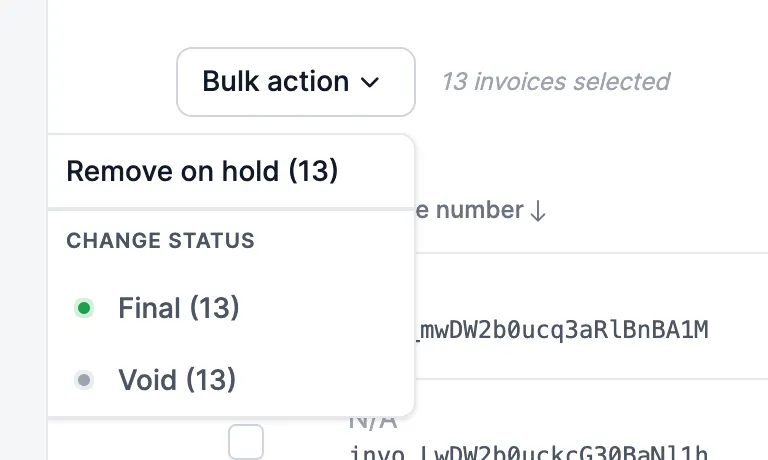
Invoice statuses can be updated in bulk from the invoice overview page in Desk. Access the ‘Bulk Edit’ option to open the bulk edit view, where you can select up to 15 invoices simultaneously.
Once you’ve chosen the invoices, the ‘Bulk Action’ dropdown on the right-hand side presents all actions applicable to the selected invoices. For instance, invoices in Draft status can be transitioned to Final or Void, while those marked On-Hold can be released from the hold.
See also: Correcting invoices, Invoice payment status and Invoice date settings.