
Pausing and resuming
A paused subscription stops billing without ending, and picks up later on the same plan, price and payment method.
Why this matters
A customer who wants to stop paying for a while has two options without a pause: cancel and sign up again, or keep paying for something they are not using. Cancelling loses the contract with the customer; the plan version, the negotiated pricing, etc.
A pause keeps all of it. The subscription stays on the customer, keeps its id, its terms and its history, and nothing is billed for as long as the pause runs. This is what seasonal businesses, parental leave, a project between phases and a retention offer in a cancellation flow all need.
How it works
Pausing is a change to the chain of schedules the subscription is made of, plus a status.
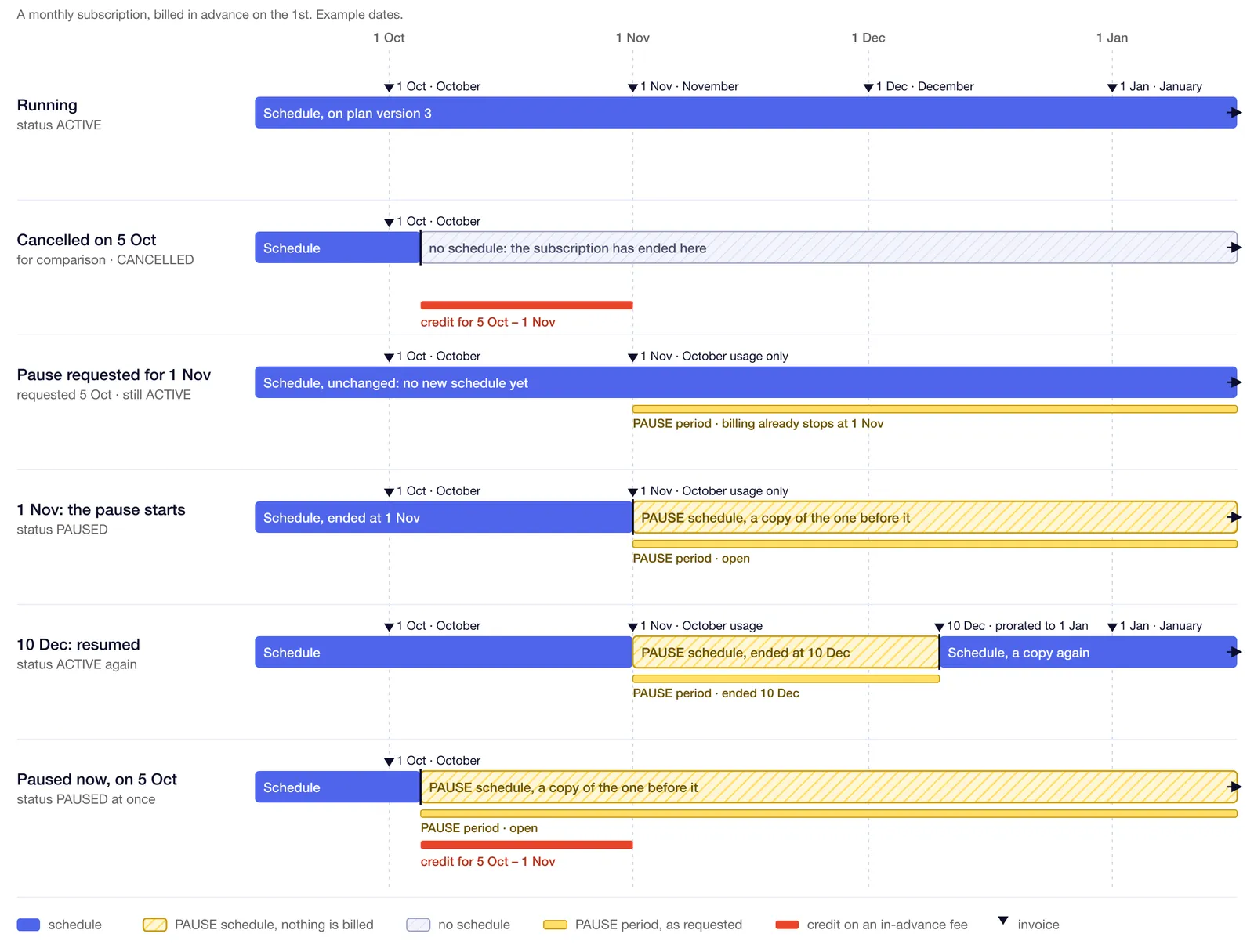
A pause request records a PAUSE inactive period on the subscription. Billing respects that period immediately, even when the pause itself starts months later: no fee is invoiced from the pause start. When the start arrives, the current schedule is ended there and a PAUSE schedule takes over, as a copy of the one it replaces. The subscription moves to status PAUSED. At the resume, the PAUSE schedule ends and another copy of the original schedule starts.
Because a PAUSE schedule fills the gap, the chain is never interrupted. That is what makes a long or open-ended pause resumable on the same subscription, and what makes an invoice recalculated months later still skip the paused span.
Status
A scheduled pause is not a status of its own. The subscription stays ACTIVE with a future PAUSE period in inactive_periods until the pause actually starts.
When the pause starts and ends
The start is from, the end is until. Both are objects with a type.
The resolved dates land on the PAUSE period as start_at and end_at, while pause.from and pause.until keep what you submitted. An end you reach early by resuming overwrites end_at and leaves pause.until alone, so the record still says what was agreed.
Implementation
Via API
Every call needs the PRICING_PLAN_SUBSCRIPTION.PAUSE permission.
Pause a subscription on a date, for one month:
The response is the subscription. The pause sits in inactive_periods, with the resolved dates next to the request:
The status is still ACTIVE and there is no PAUSE schedule yet: the subscription is paused on 1 November, and until then it keeps running. What does change straight away is the billing: the existing schedule now ends at 1 November, so no fee is invoiced beyond it.
Pause immediately and leave the end open:
Change the end of a pause that is scheduled or already running. Fields you leave out keep their stored value, and reason: null clears the reason:
Resume a PAUSED subscription before its planned end:
Deleting a scheduled pause takes no body, and only works before the pause has started:
Pauses and cancellations are kept apart: deleting a scheduled cancellation never removes a pause, and deleting a pause never removes a cancellation. See Cancelling subscriptions.
Via Desk
Open the subscription and use its menu: Pause, then Change pause, Delete scheduled pause or Resume once a pause exists. The pause end is chosen as a date, as a period, or left open until someone resumes it.
A paused subscription carries a Paused chip, and a scheduled pause shows as an alert on the subscription with the date it starts. The schedules of a paused subscription are read-only: no schedule can be added or edited while a pause is open. The subscription lists filter on the PAUSED status like any other.
What the customer is billed
realign_billing_dates changes the last row. Left false, billing stays on its original calendar: a subscription billed on the 1st and resumed on 10 December is invoiced 10 December to 1 January, then on 1 January as usual. Set it to true and the billing date moves to the resume date, so the invoice runs 10 December to 10 January and every month on the 10th. It can be set when pausing, changed with a PATCH, or given on the resume call, and it only applies to EXACT billing: on CALENDAR billing it is refused.
Webhooks
A PRICING_PLAN_SUBSCRIPTION webhook fires on every step, so an external system can follow the whole sequence without polling:
PAUSE_SCHEDULED, PAUSE_UPDATED, PAUSED, RESUMED and PAUSE_DELETED.
Cancellation gained the matching set in the same release: CANCEL_SCHEDULED, CANCEL_DELETED and CANCELLED, where CANCELLED fires when the status actually becomes CANCELLED. Scheduled upgrades report UPGRADE_SCHEDULED and UPGRADE_DELETED. See Webhooks.
Every pause action is written to the audit log with the user who made it. The transitions that run on a date are recorded as system actions.
Edge cases
- Not during the initial term. A pause cannot start before the initial term ends, so a pause never stretches a committed term. A subscription without an initial term has no such restriction.
- One at a time. A subscription cannot be paused while a cancellation, an upgrade or another pause is open, and it cannot be cancelled while a pause is scheduled but has not started. Delete the scheduled pause first.
- Cancelling a paused subscription is allowed, with cancel type
NOWorDATE. - No schedule may start after the pause. A pause is refused when an active or draft schedule already starts at or after the pause start, and no schedule can be added after a pause has been scheduled. Plan changes and upgrade quotes are blocked for the same reason.
- Trial schedules. A pause cannot start inside a
TRIALschedule, because the resume would copy trial pricing into a normal schedule. - Usage sent during a pause is ignored. Events still arrive and are stored, but nothing is priced for the paused span.
- Coupons and discounts keep their dates. A coupon that runs out during the pause is spent; it is not extended by the time the subscription stood still.
- Fees that grant wallet credits are not prorated or refunded at the pause, and the full fee is charged again at the resume.
- Minimum commitments apply in full to the shortened period before the pause, exactly as they do on a cancellation.
- Renewal. A renewal that falls inside the pause does not run. On resume, the new schedule keeps the original end date when it is still in the future; otherwise it starts a fresh renewal term, or stays open-ended when auto-renewal is off.
- Copying a subscription turns its
PAUSEschedules into ordinary ones, so the copy is not born paused. - Voiding stays blocked while a subscription is paused. Cancel it first.