For AI agents: a documentation index is available at the root level at /llms.txt and /llms-full.txt. Append /llms.txt to any URL for a page-level index, or .md for the markdown version of any page.
Logo
LoginSandbox
Platform GuidesAPI DocsSDKMCP ServerChangelog
  • Getting started
    • Introduction
    • Concepts
    • Onboarding guide
  • Use cases
    • Monetizing an AI agent
    • Pricing models for AI products
    • Configuring entitlements for AI products
  • Usage metering & events
    • Meters
      • Meter values
      • Meter properties
      • Usage metrics
    • Usage events
    • Unmatched events
    • Event reprocessing
  • Products & plans
    • Product Catalog
    • Pricing Plans
    • Features & Entitlements
  • Wallets & credits
    • Credit types & wallets
    • Credits in pricing plans
  • Customers & subscriptions
    • Customers
    • Subscriptions
    • Quotes
  • Invoicing
    • Invoices
    • Invoice corrections
    • Payment Collections
    • Tax
    • Currencies & Exchange rates
    • E-invoicing
  • Analytics & reporting
    • Insights
    • Report downloads
    • Revenue Recognition & Deferred Revenue
  • Integrations
    • CRM
    • ERP
    • Email Providers
    • Data Imports: Event File Uploads
    • Data Exports
    • Payment Service Providers
  • Settings & admin
    • Billing entities
    • Payment Options
    • User management
    • Customising invoices
    • Custom fields
    • Default platform settings
    • API key creation
    • Alert Rules
    • Workflows
  • Workflows
    • Workflow Triggers
    • Workflow Actions
    • Monitoring and Audit
    • Common Use Cases
  • For developers
    • Introduction
    • Authentication
    • Local development setup
    • API
    • Errors
    • Troubleshooting
    • Query Parameters
    • Expanding Responses
    • Idempotency
    • Timestamp formatting
    • Webhooks
    • Locale
    • MCP Server
LoginSandbox
On this page
  • Calculation methods
  • Sum
  • Max
  • Min
  • Unique
  • Average
  • Rolling / Persist functionality
  • Persisting within multi-schedule subscriptions
  • Creating usage metrics
Usage metering & eventsMeters

Usage metrics

Was this page helpful?
Previous

Usage events

Next
Built with

Meter values should always be configured with a calculation method - it is the basis on which calculations can be made and outcomes are generated. The configuration of calculation methods is not mandatory, but without a calculation method, your meter cannot be connected to a product.

The meter value in combination with a calculation method eventually results in a quantity on an invoice. Once you have meters configured with calculation methods, they can be connected to products in the product catalog section.


Calculation methods

The calculation methods of your meter values define what calculation is performed while aggregating the events:

Sum

The most common calculation method to aggregate events is a summation. The meter values are summed within the subscription billing period.

Max

Determines the maximum of all given meter values within a subscription billing period.

Min

Determines the minimum value of all received events within a billing period.

Unique

Count of unique events for a certain meter property value.

Average

The average value of all received meter value events within a billing period.


Rolling / Persist functionality

All of the above calculation metrics can be used in combination with the Rolling, or Persist tag, means that the calculation of all received events will not be reset at the beginning of a new invoice billing period, but it will be taken into the next billing period.

The calculation metrics are called:

  • Rolling Sum
  • Rolling Max
  • Rolling Min
  • Rolling Average

The customer is thus billed each time for the entire number. This functionality is used most for seat-based pricing where events can be either positive (a seat was added) or negative (a seat or account was subtracted).

Persisting within multi-schedule subscriptions

The persist functionality means that the calculation is done over multiple billing periods, but within the subscription schedule.

If the subscription has one schedule from the 1st of March until 31st of December with a monthly billing cycle, a product item with a rolling usage metric will be charged at the end of the schedule (e.g. on the invoice of 1 january of the next year).


Creating usage metrics

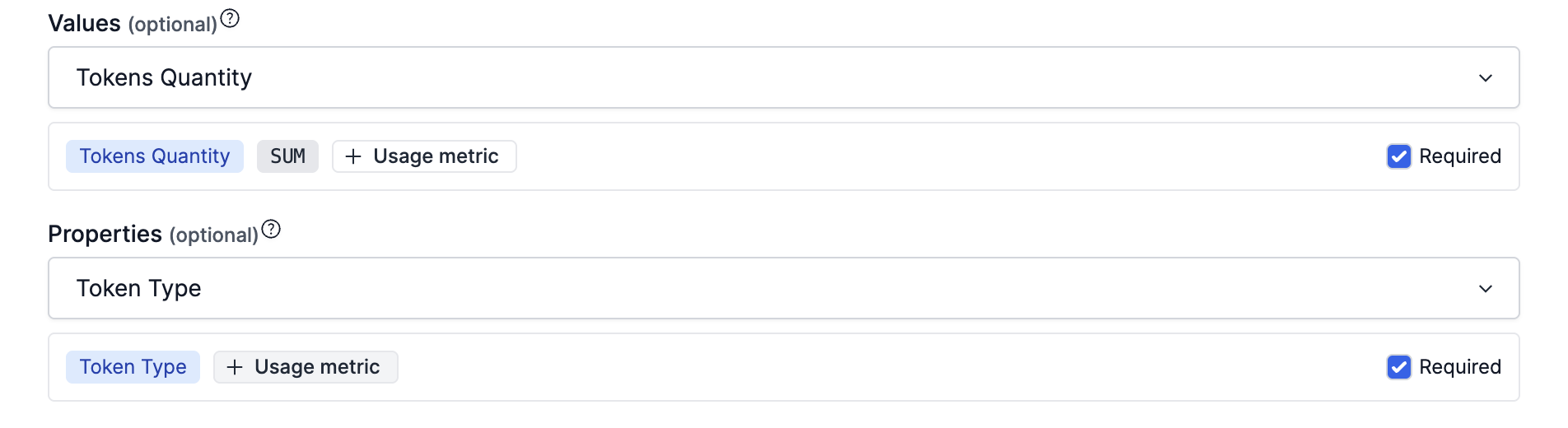
Usage metrics (meter values in combination with a calculation method) can be created in the Meters section of Desk. Add calculation methods to existing meters to create user metrics or create new ones from scratch.

Usage metrics can in turn be connected to Features and Product Items.