
For AI agents: a documentation index is available at the root level at /llms.txt and /llms-full.txt. Append /llms.txt to any URL for a page-level index, or .md for the markdown version of any page.
Logo
LoginSandbox
Platform GuidesAPI DocsSDKMCP ServerChangelog
  • Getting started
    • Introduction
    • Concepts
    • Onboarding guide
  • Use cases
    • Monetizing an AI agent
    • Pricing models for AI products
    • Configuring entitlements for AI products
  • Usage metering & events
    • Meters
    • Usage events
    • Unmatched events
    • Event reprocessing
  • Products & plans
    • Product Catalog
    • Pricing Plans
    • Features & Entitlements
  • Wallets & credits
    • Credit types & wallets
    • Credits in pricing plans
  • Customers & subscriptions
    • Customers
    • Subscriptions
    • Quotes
  • Invoicing
    • Invoices
    • Invoice corrections
    • Payment Collections
    • Tax
    • Currencies & Exchange rates
    • E-invoicing
  • Analytics & reporting
    • Insights
    • Report downloads
    • Revenue Recognition & Deferred Revenue
  • Integrations
    • CRM
    • ERP
    • Email Providers
    • Data Imports: Event File Uploads
    • Data Exports
    • Payment Service Providers
      • Adyen
        • Step 1: Merchant Account configuration
        • Step 2: API Credential Configuration
        • Step 3: Connect Solvimon to Adyen
        • Step 4: Webhook configuration
        • Step 5: Adyen Auto Rescue
        • Step 6: Configure Payment Acceptor
        • Step 7: Share API URLS with Solvimon
      • Stripe
  • Settings & admin
    • Billing entities
    • Payment Options
    • User management
    • Customising invoices
    • Custom fields
    • Default platform settings
    • API key creation
    • Alert Rules
    • Workflows
  • Workflows
    • Workflow Triggers
    • Workflow Actions
    • Monitoring and Audit
    • Common Use Cases
  • For developers
    • Introduction
    • Authentication
    • Local development setup
    • API
    • Errors
    • Troubleshooting
    • Query Parameters
    • Expanding Responses
    • Idempotency
    • Timestamp formatting
    • Webhooks
    • Locale
    • MCP Server
LoginSandbox
IntegrationsPayment Service ProvidersAdyen

Step 5: Adyen Auto Rescue

Was this page helpful?
Previous

Step 6: Configure Payment Acceptor

Next
Built with

In order for Adyen Auto Rescue to work a configuration by Adyen support is required, for more details see: https://docs.adyen.com/online-payments/auto-rescue/ Email to support@adyen.com: Hi Adyen support team, Could you please enable Adyen Auto-Rescue on the following Merchant Account: XXX
for Cards only, please. Best Regards

Solvimon has a native integration to Adyen Auto-Rescue.

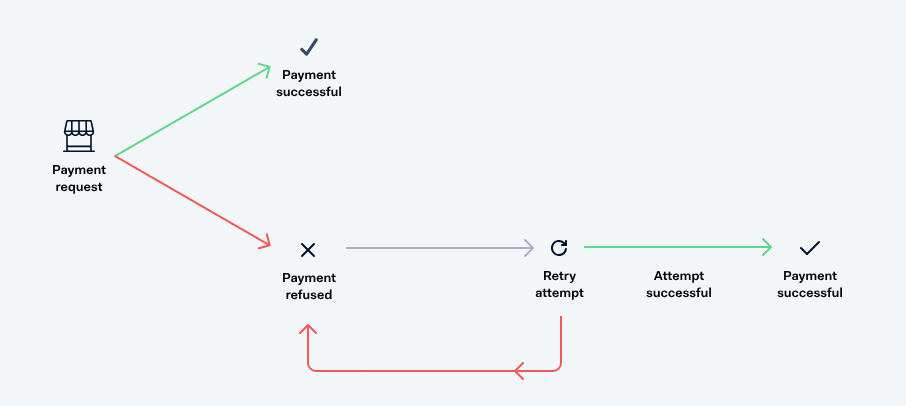
Adyen’s Auto Rescue automatically retries refused or charged back shopper-not-present transactions such as subscription renewals. It uses smart logic to decide which payments can succeed when retried later, and performs these retries at optimal times.

A payment can be refused, in case of card transaction, or charged back, in case of a SEPA direct debit transaction, due to many reasons. In some cases, for example, when the shopper’s account has insufficient funds, the payment may still succeed when submitted again at a later point in time. In other scenarios, for example when the shopper’s account has been closed, the payment is declined permanently.

Auto Rescue schedules retries for refused or charged back payments that have a chance of succeeding. It may take several retry attempts to rescue a payment. These attempts occur within a rescue window.

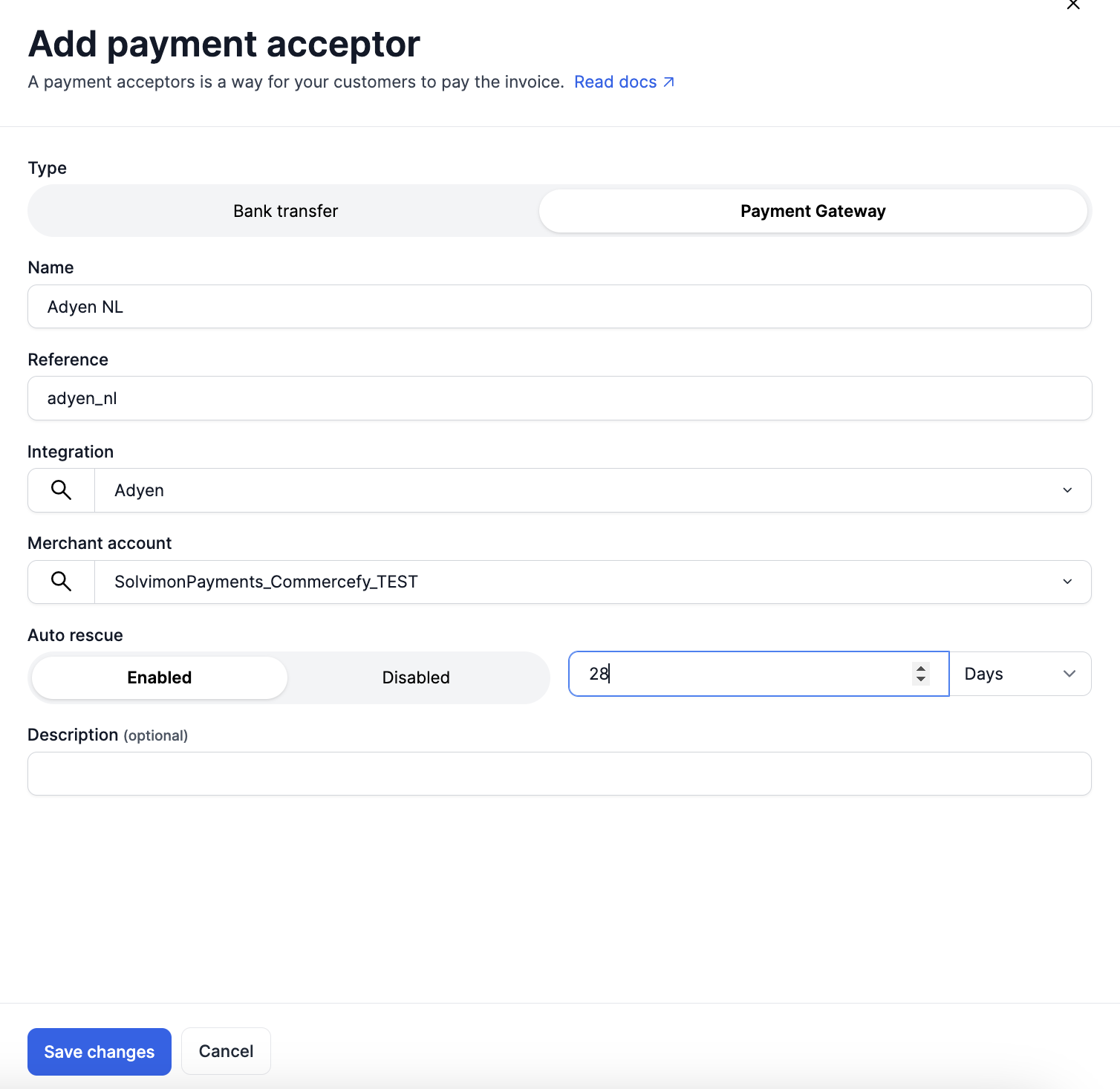
Setting the Auto-rescue window in Solvimon can be done in the Billing Entity - > Payment Acceptor settings.
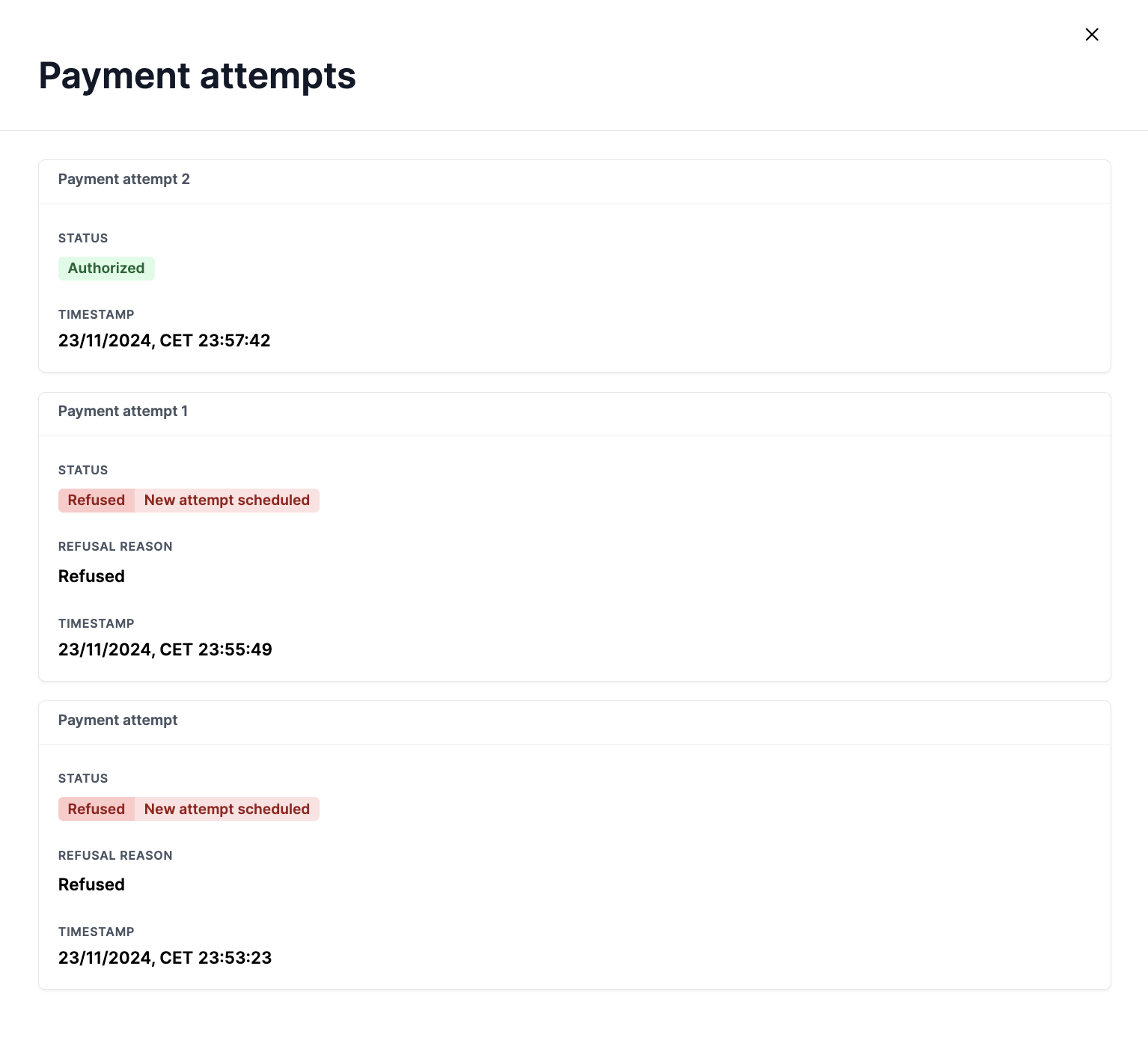
On the invoice level you can find Payment Attempts to see the dunnings process.

More information about Adyen Auto-rescue can be found here:
https://docs.adyen.com/online-payments/auto-rescue/